
High-speed camera hire · Melbourne, Australia
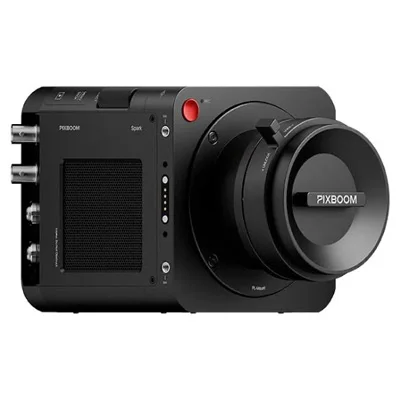
Pixboom Spark
4K slow motion. More time to catch the unexpected.
Capture the detail in a splash, a sprint or a split-second impact with the Pixboom Spark. Available through Melbourne cinematographer Tom David for camera hire and slow motion productions in Melbourne and across Australia.
The compact Super 35 camera combines a global shutter with continuous recording to removable media, giving unpredictable action room to unfold.
937 fpsTested at DCI 4K
Global shutterCapture fast movement
Continuous takesRecord directly to media
Slow motion for sport, action and commercial production
The Spark suits sports, wildlife, stunts, splashes and action that is difficult to predict or repeat. Its longer recording window lets a small crew keep the camera running while the moment develops. It also brings detailed slow motion to advertising, branded content and studio shoots.
The Pixboom Spark is available for dry hire for your own camera crew to operate, with preparation and footage handling support arranged to suit the production. For a shoot with Tom, discuss the brief, locations, lighting and required delivery format before choosing the camera setup.
Pixboom Spark frame rates and resolution
| Mode | Resolution | Frame rate |
|---|---|---|
| 4.6K open gate | 4608 × 3072 | 670 fps |
| DCI 4K (tested) | 4096 × 2160 | About 937 fps |
| Cropped 2K | 2048 × 864 | 2,182 fps |
| Higher-speed crop | 2048 × 512 | 3,625 fps |
Available frame rates depend on resolution, crop, recording mode and installed firmware. Confirm the booked setup for your required delivery format. Cropped modes change the field of view and lens coverage.
Longer takes, with a practical media plan
The Spark writes to a Pro Card rather than a fixed RAM buffer. Robotface’s test filled a 2.5 TB card in just under nine minutes at 4K and 937 fps. For production planning, allow roughly five to eight minutes per card depending on settings. Recording duration also depends on power and operating conditions.
The same setup offered approximately three seconds of pre-cache at 4K and 937 fps, useful when a trigger comes slightly late. In-camera playback runs at 25 fps with 2× and 4× review options.
Camera kit and RAW post-production
The referenced package includes the Spark camera, PL and EF mounts, cage, monitor and a 2.5 TB Pro Card. Lenses and destination SSDs are arranged separately. Confirm kit inclusions and any additional media when enquiring.
Robotface’s firmware V1.1.0 configuration records 10-bit PXBC. Convert this media through PIXBOOM Cine to CinemaDNG for RAW grading in DaVinci Resolve, then export to ProRes or your delivery codec. Twelve-bit recording and ProRes RAW are not available in that setup.
Allow time for offloading, backups and conversion. Robotface measured media copying at around 800 MB/s, but conversion can take substantially longer and depends on the computer. Its current workflow erases a whole card rather than individual clips, so plan media changes and offloads between setups.
Pixboom Spark or Phantom VEO 4K?
Choose the Spark when an extended recording window and a compact kit help you follow the action. For carefully timed tabletop work, motion control and fast on-set RAW playback, the Phantom VEO 4K may suit the workflow better.
Explore Robotface’s Phantom VEO 4K and Pixboom Spark comparison, or talk to Tom about your shot.
Pixboom Spark hire FAQs
Can I dry hire the Pixboom Spark?
Yes. The Pixboom Spark is available for dry hire for your own camera crew to operate. Contact Tom to confirm availability, preparation, freight and any camera or post-production support required.
How long can the Spark record?
Recording is limited by media capacity and settings. Robotface tested just under nine minutes at 4096 × 2160 and 937 fps on a 2.5 TB Pro Card. Plan around five to eight minutes per card depending on the configuration.
What is included in the camera kit?
The camera package includes the Spark body, PL and EF mounts, cage, monitor and a 2.5 TB Pro Card. Lenses, destination drives and additional production equipment are arranged separately.
How is Pixboom footage handled in post?
The referenced V1.1.0 setup records 10-bit PXBC. Copy the media to storage, convert it to CinemaDNG with PIXBOOM Cine, then grade in DaVinci Resolve and export to the required delivery codec. Allow time and storage for conversion.
Is the Spark available outside Melbourne?
Australia-wide hire can be arranged. Confirm freight, dates, the operating crew and the camera configuration with Tom before booking.
Plan your next slow motion shoot
Send Tom your shoot dates, location, subject and delivery requirements to discuss Pixboom Spark availability, camera hire and cinematography.
Technical reference: Robotface’s Pixboom Spark guide and high-speed camera FAQs. Configuration and workflow details should be confirmed when booking.